Monkeyformats auf Safari

monkeyformats logo

Mit Hilfe des vorhin erwähnten GreaseKit funktionieren die Monkeyformats jetzt auch im Safari 🙂

Benötigt wird:

Und genau in der Reihenfolge sollte man die Tools auch installieren…

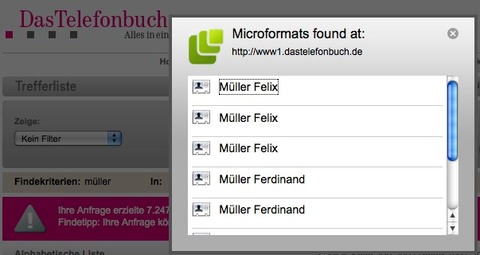
monkeyformats-safari.jpg

Leider funktioniert das Szenario nicht ganz so reibungslos wie auf mit Firefox + Greasemonkey + Operator da die SIMBL-Plugins wohl in umgekehrter Reihenfolge (zuerst Microformats-Plugin und dann GreaseKit + Monkeyformats) die Seite abarbeiten.

Es gibt aber ’nen kleinen Workaround:

  • Zuerst die Monkeyformats Seite aufrufen (z.B. Telefonbuch.de wie im Screenshot) – Kein µF-Icon Sichtbar
  • Eine Seite mit (nativen) Microformats (z.B. notiz.blog) in neuem Tab öffnen – µF-Icon Sichtbar
  • Wieder auf ersten Tab wechseln – µF-Icon Sichtbar

Das Safari-Microformats-Plugin ist leider auch noch etwas spartanisch und nicht ganz so komfortabel und flexibel wie Operator für Firefox, aber es reicht um hCards und hCalendars zu verarbeiten.

Schön dass die Idee mit etwas Mehraufwand (aber ohne Anpassungen) auch im Safari funktioniert 🙂

(via: monkeyformats.org)

Matthias Pfefferle
Matthias Pfefferle
@pfefferle@notiz.blog

Ich bin Webworker und arbeite als „Open Web Lead“ @ Automattic. Ich blogge, podcaste und schreibe eine Kolumne über das open, independent und federated social Web. Mehr über mich.

767 Beiträge
815 Folgende
Fediverse Reactions

3 Kommentare zu „Monkeyformats auf Safari“

  1. Nicht ganz so komfortabel – aber ich benutze es schon eine Weile – ist das Microformats Bookmarklet von von Left Logic https://web.archive.org/web/20100712140505/http://leftlogic.com:80/lounge/articles/microformats_bookmarklet

  2. Cool, die Monkeyformats funktionieren auch mit dem Bookmarklet…

    monkeyformats-bookmarklet.jpg

    …und das Bookmarklet ist mindestens so komfortabel wie das Plugin.

    Danke für den Tipp.

  3. Schöner Tip mit dem Bookmarklet. Danke schön.

Schreibe einen Kommentar

Deine E-Mail-Adresse wird nicht veröffentlicht. Erforderliche Felder sind mit * markiert

To respond on your own website, enter the URL of your response which should contain a link to this post’s permalink URL. Your response will then appear (possibly after moderation) on this page. Want to update or remove your response? Update or delete your post and re-enter your post’s URL again. (Find out more about Webmentions.)