Writing Blog-Comments using an hCard

I wrote a small Plugin that allows your users to easily fill out the comment forms of your WordPress Blog using an hCard. I got this Idea from SignUp pages like bragster.com or getsatisfaction.com.

After the installation, you get a small (import hCard) link behind your URL field in the comment form (if not, use <?php hcard_commenting_link() ?>).

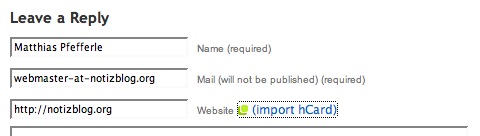
hCard Commenting Step 1

If you want to write a comment using this festure, you simply have to fill out the „Website“ field with an URL to one of your hCards and to klick the „import hCard“ link.
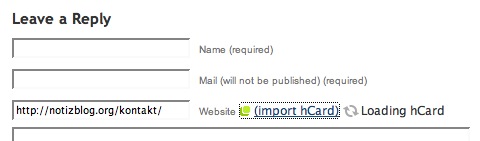
hCard Commenting Step 2

…and thats it.

hCard Commenting Step 3

To try out this plugin, you can use my comment form.

One of the next steps would be some kind of avatar feature using the hCard photo (thanks to Brian Suda for the idea).

You can download this version on the WordPress Plugin area: http://wordpress.org/extend/plugins/hcard-commenting/

Matthias Pfefferle
Matthias Pfefferle
@pfefferle@notiz.blog

Ich bin Webworker und arbeite als „Open Web Lead“ @ Automattic. Ich blogge, podcaste und schreibe eine Kolumne über das open, independent und federated social Web. Mehr über mich.

767 Beiträge
815 Folgende
Fediverse Reactions

11 Kommentare zu „Writing Blog-Comments using an hCard“

  1. Avatar von Wojtek Zając
    Wojtek Zając

    That’s great, I was about to prepare similar plugin too. Thanks a bunch!

  2. @Wojtek: Thanks for your comment, and please let me know if you had any ideas that I haven’t considered.

  3. lifestrea.ms

    solution-media.thomas.huhn comments on lifestrea.ms: Very cool idea, Matthias……

    Very cool idea, Matthias! Great work!
    Cheers,
    Thomas…

  4. Avatar von Grant McAllister
    Grant McAllister

    I Just found a problem using this while importing mine. My page with my hCard details has two email addresses a personal and business. So it returned none. My page is still valid maybe it should import the first one i don’t know if that is possible with the technique you use thou.

  5. @Grant: I think it is possible (I use hKit to parse the hCard). Can you give me the link to your hCard, that I can try it out?

  6. @Grant: If there is more than one mail address the plugin takes the first (the same with urls), but it seems linke the hKit parser doesn’t recognize any of your email addresses (http://tinyurl.com/2cwh22).

    Any suggestions?

  7. I tried the plugin with the ufXtract service and it works perfect. I have uploaded the new plugin to this weblog, that you also can test it.

  8. Avatar von Carsten Pötter
    Carsten Pötter

    Good to see people working on tools which make easier for people to use the net. Nice one!

  9. @Carsten, @Thomas: Thanks 🙂

  10. […] eine Frage des persönlichen Geschmacks. Auf jeden Fall ist die Idee von Matthias Pfefferle genial!NotizblogBlogPermalink Zur Zeit sind leider (noch) keine Kommentare möglich. Das Kommentarformular hier ist […]

Schreibe einen Kommentar

Deine E-Mail-Adresse wird nicht veröffentlicht. Erforderliche Felder sind mit * markiert

To respond on your own website, enter the URL of your response which should contain a link to this post’s permalink URL. Your response will then appear (possibly after moderation) on this page. Want to update or remove your response? Update or delete your post and re-enter your post’s URL again. (Find out more about Webmentions.)