Atom Cross-posting Extensions

Problem:

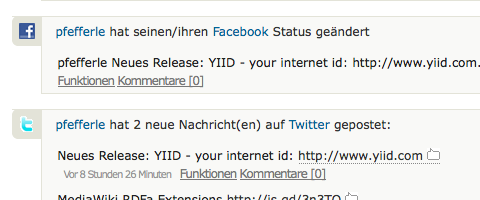
Problem: Cross-posting and duplicates


Quelle: Lifestream.fm

Lösung: Atom Cross-posting Extensions von Martin Atkins

<entry>
  <title>Using Microformats: Gateway to the Semantic Web | Professional Communication Society</title>
  <link rel="alternate" href="http://pfefferle.yiid.com/activity/11891"></link>
  <updated>2009-10-06T13:10:11Z</updated>
  <author>
    <name>Matthias Pfefferle</name>
  </author>
  <id>tag:www.yiid.com,2009-10-06:/activity/11891</id>
  <summary type="text">...</summary>
  <content type="html"><![CDATA[...]]></content>
  
  <crosspost:source>
    <id>http://delicious.com/url/29ff30b281955db394f2c399c028c480#pfefferle</id>
    <link rel="alternate" href="http://delicious.com/url/29ff30b281955db394f2c399c028c480#pfefferle" type="text/html" />
  </crosspost:source>
  
</entry>Code-Sprache: HTML, XML (xml)

Wenn ihr so kommentierfaul seid, dann bin ich mal schreibfaul 😉

Matthias Pfefferle
Matthias Pfefferle
@pfefferle@notiz.blog

Ich bin Webworker und arbeite als „Open Web Lead“ @ Automattic. Ich blogge, podcaste und schreibe eine Kolumne über das open, independent und federated social Web. Mehr über mich.

767 Beiträge
826 Folgende
Fediverse Reactions

8 Kommentare zu „Atom Cross-posting Extensions“

  1. wenn du so rummotz werden wir nicht kommentier-fleissiger ^^

    1. Ups… Verallgemeinerungs-Falle 😉

  2. Avatar von christian
    christian

    Nu kabbelt ihr euch schon im Blog.. nene..

  3. na im office dürfen wir ja nicht mehr

  4. Jetzt wollte ich ernsthaft mal sachlich kommentieren… aber das würd hier ja eh nur untergehen 😉

  5. @nils du hast die <ironie /> – Tags vergessen 🙂

  6. Update auf einfach alles. 🙂

  7. Avatar von christian
    christian

    das hier ist bestimmt der am meisten kommentierte Beitrag der letzen Jahre.. armer Pfeffi..

Schreibe einen Kommentar

Deine E-Mail-Adresse wird nicht veröffentlicht. Erforderliche Felder sind mit * markiert

To respond on your own website, enter the URL of your response which should contain a link to this post’s permalink URL. Your response will then appear (possibly after moderation) on this page. Want to update or remove your response? Update or delete your post and re-enter your post’s URL again. (Find out more about Webmentions.)