Schlagwort: FediBlog

  • Wie schon mehrfach berichtet wurde, hat Google mit der Social Graph API einen großen Schritt in Richtung DataPortability gemacht. Die Social Graph API ist eine weiterer Coup von Brad Fitzpatrick (Live Journal, memcached und OpenID) und bietet eine einfache API um „public connections“ die man zu genüge im Netz erstellt hat zu interpretieren um wiederverwendbar zu machen.

    With the Social Graph API, developers can now utilize public connections their users have already created in other web services. It makes information about public connections between people easily available and useful.

    Social Graph API

    Die Google API setzt hauptsätzlich auf das Microformat XFN (V 1.1) zum darstellen des Sozialen Netzes.

    XHTML Friends Network benutzt das rel Attribut von Links um Verbindungen zwischen Personen darzustellen. <a rel="me" /> kennzeichnet z.B. eine weitere Webseite des Verlinkenden. Weitere Formate (bei Google Edge Types) sind das auf RDF basierende FoaF und OpenID delegation Links <link rel="openid.delegate" />.

    Die API ist recht simple und lässt sich komplett über URL Key/Value Paare konfigurieren…

    http://socialgraph.apis.google.com/lookup?<parameter 1>&<parameter 2>&<parameter n>

    …und stellt die Ergebnisse in JSON dar.

    Social Graph API Client

    Steve Ivy einer der Gründer des DiSo Projekts hat eine Social Graph API Client Klasse in PHP geschrieben und im DiSo SVN zur Verfügung gestellt.

    I wrote a quick and dirty client in PHP that cosumes the JSON and returns it in a data structure. #


    Eine kleine Einführung in die Social Graph API vom Autor selbst:

    (mehr …)
  • Da ich gerade geschäftlich etwas im Stress bin und die letzten Tage nicht vor 20 Uhr nach Hause gekommen bin, wird es die nächsten Tage nur kleinere Posts geben. Ich hoffe das pendelt sich nächste Woche wieder einigermassen ein…

    Zum Thema… Vorgestern hat Matt Mullenweg (der Gründer von Automattic) ein neues Theme mit Namen „Prologue“ vorgestellt. Das Besondere an Prologue ist sein simpler Aufbau und die Ähnlichkeit zu Twitter.

    WordPress Prologue

    Die Idee für das Theme kam folgendermassen:

    […] like a way for each of us to share short messages about what we’re doing or working on internally, or private messages between groups of folks.

    …und genau das ist leider auch das Manko an Prologue. Das Theme ist so aufgebaut, dass von jedem Autor nur der neuste Post angezeigt wird, d.h. es wird nur ein Post angezeigt wenn man es alleine verwendet 🙁 . Eigentlich schade, weil ich Twitter sehr mag und das schlichte Design von Prologue sehr schick finde. Aber vielleicht habe ich ja doch Glück und jemand nimmt sich das Theme nochmal vor:

    This isn’t something we’re personally interested in, but we’ve made the theme available as open source under the GPL so if you want to hack around it yourself you’re welcome to.

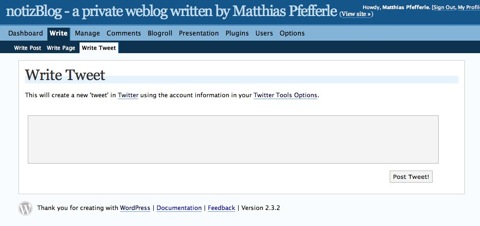
    Wo wir gerade bei WordPress und Twitter sind… Twitter Tools ist ein umfassendes Twitter Plugin für WordPress, um Daten in allen Variationen zwischen Twitter und WordPress auszutauschen.

    Twitter WordPress Plugin

    Ein Muss für jeden Twitter-Fan 🙂

  • Nach einem Blog-Eintrag von Florian Jensen will AOL für seinen Instant Messenger (kurz IM) AIM, zukünftig auf XMPP (oder auch Jabber) setzen.

    Eine Anleitung im Jabber Wiki erklärt die Schritte:

    1. JIDs like uin@aol.com or username@aol.com
    2. Host: xmpp.oscar.aol.com : 5222
    3. Allow SASL PLAIN
    4. Turn on StartTLS
    5. Make sure there is no ‚@‘ in the resource (bug in the service). Some clients by default add a resource with an @ in it. So you have to overwrite this

    Ich hab das ganze mal mit Adium ausprobiert und mit folgende Einstellungen sollte es funktionieren:

    aol-jabber-adium.jpg

    Das ganze läuft noch etwas holprig, aber nach ein paar Versuchen hab ich’s dann doch geschafft zu verbinden.

    aol-jabber-online.jpg

    Vorerst kann man nur anderen AIM-Usern Nachrichten schreiben, aber das wird wohl daran liegen dass der Server noch Beta ist.

    Wäre schön wenn AOL XMPP weiter ausbauen würde, um nach dem Einsatz von OpenID einen weiteren großen Schritt in Richtung DataPortability zu gehen.
    Wenn jetzt auch noch Yahoo! und Microsoft auf den Offenen Standard umsteigen würden, könnte man in Zukunft vielleicht über einen Account mit ICQ, AIM, Y! Messenger und MSN Nutzern in Kontakt zu treten.

    Weiterführende Links:

  • There are two big changes in the new WP-APML version:

    • Links and Feeds, are now part of the APML Feed. Sample: https://notiz.blog/apml/
    • You can search through my blog using your APML file and there is also a sidebar-widget with some meta-informations. Sample: https://notiz.blog/apml/search/?s=http://notsorelevant.com/wp-apml.php

    What do you think about it? Any ideas to make something better?

    If there are no more suggestions and if everythinks works fine, I would release it in the next few days.

  • Nachdem newsgator, die Firma hinter NetNewsWire (NNW) und FeedDemon, am Mittwoch bekannt gab dass die neuen Versionen ihrer RSS Reader ab sofort kostenlos erhältlich seien…

    NewsGator Releases New Versions of Client Products; Best-of-Breed RSS Readers Now Free. #

    …habe ich mir mal den neuen FeedDemon angeschaut und entdeckt, dass er ab der Verion 2.6 schon APML unterstützt.

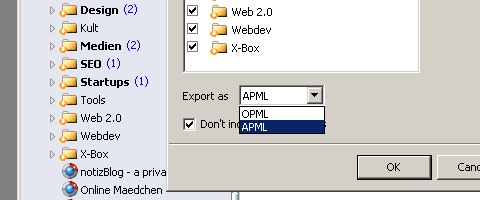
    feeddemon apml

    Wie schon im Oktober angekündigt unterstützt diese Version zuerst einmal den Export der Feeds in APML (ähnlich wie beim OPML export):

    The first step will be APML export, which is already underway. Once we’ve worked out a few details, we’ll also support APML import.

    Die APML Sources sehen beispielsweise so aus:

    APML: <Source key="http://feeds.feedburner.com/notsorelevant" from="Not So Relevant" updated="2008-01-11T00:00:28" value="0,00" type="application/rss+xml" path="Web 2.0"/>

    Es handelt bei dem Feed-APML also um eine Art OPML-File mir Bewertung.

    OPML: <outline text="Not So Relevant" title="Not So Relevant" type="rss" xmlUrl="http://feeds.feedburner.com/notsorelevant" htmlUrl="http://www.notsorelevant.com" description="another look on music and the web"/>

    Wer genau wissen will wie sich der value Wert errechnet, kann ja mal den „How Does FeedDemon Calculate Attention?“ – Artikel bei Nick Bradbury lesen. Mal gespannt wie die APML-Importfunktion aussehen wird und wann die anderen Feed Reader von newsgator nachziehen werden.

  • I wrote a small Plugin that allows your users to easily fill out the comment forms of your WordPress Blog using an hCard. I got this Idea from SignUp pages like bragster.com or getsatisfaction.com.

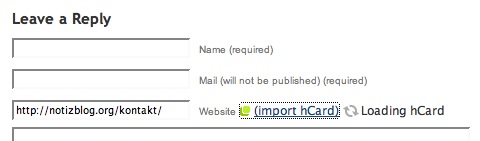
    After the installation, you get a small (import hCard) link behind your URL field in the comment form (if not, use <?php hcard_commenting_link() ?>).

    hCard Commenting Step 1

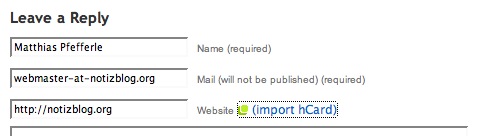
    If you want to write a comment using this festure, you simply have to fill out the „Website“ field with an URL to one of your hCards and to klick the „import hCard“ link.

    hCard Commenting Step 2

    …and thats it.

    hCard Commenting Step 3

    To try out this plugin, you can use my comment form.

    One of the next steps would be some kind of avatar feature using the hCard photo (thanks to Brian Suda for the idea).

    You can download this version on the WordPress Plugin area: http://wordpress.org/extend/plugins/hcard-commenting/

  • Ich bin vor einiger Zeit schon auf das microJSON Projekt gestoßen und fand die Idee, ein einheitliches JSON Format für alle Microformats zu erstellen, prinzipiell nicht schlecht, deshalb habe ich auch versucht microJSON für mein hCard-Commenting Script einzusetzen.

    Bei genauerem Betrachten gibt es bei der jCard aber zwei unschöne Eigenschaften:

    1. Das n Attribut wird in JSON als name dargestellt.
    2. Das fn Attribut wird gat nicht abgebildet.

    Da ich, um den Username in den WordPress Kommentaren darzustellen, auf fn angewiesen bin, habe ich mir verschiedene andere „hCard to JSON“ Services angeschaut.

    Test-hCard: http://pfefferle.org/static/microformats/hcard-test.html

    (mehr …)
  • This plugin creates an APML Feed using the the native tags and categories of WordPress 2.3.x, but it also supports UltimateTagWarrior and SimpleTagging for WordPress 2.0.11 – 2.2.x.

    New Features:

    • Native WordPress Plugin
    • One version for WordPress 2.x up to 2.3.x
    • Permalinks support
    • Supports native Tagging as well as UltimateTagWarrior/SimpleTagging

    Demo: http://notiz.blog/apml/.

    Possible features for the next Versions:

    • Sidebar widget
    • I plan to integrate some kind of search which supports apml files…

    Any suggestions are very welcome.

    You can download this version on the WordPress Plugin area: https://wordpress.org/plugins/apml/ or from the APML SVN: http://apml-library.googlecode.com/svn/trunk/wordpress/2.x-2.3.x/

  • eX Skin

    Mehr bei Blackbolt.

  • GraphSync ist ein weiteres DataPortability Projekt und richtet sich hauptsächlich an Entwickler. Das Projekt hat das Ziel, ähnlich wie auch DiSo, Daten wie z.B. Profile oder IM Kontakte wiederverwertbar zu machen (Social Network Portability oder Data Portability).

    Bei GraphSync geht es aber nicht, wie beim DiSo, darum seine Daten und Netze an zentraler Stelle zu vereinen um sie mit in die verschiedenen Communities zu nehmen, sondern um das genaue Gegenteil:

    1. Pick a proprietary silo of user’s personal social data
    2. Write some open source code to extract their data
    3. Place their data into the open formats listed below.
    4. Link to the code repository on the DataPortability Wiki.
    5. Win the love and admiration of a grateful community

    Ziel ist es, proprietäre Daten aus Communities zu extrahieren, um sie dann mit Hilfe von Offenen Standards portabel zu machen. Die von GraphSync vorgeschlagenen Formate sind:

    1. User Details: hCard
    2. Friends List: XFN
    3. Interests: APML
    4. Updates: RSS

    Weitere Infos gibts im Wiki oder in der Google Group.

    Bin sehr gespannt auf die ersten Services…