Simple coComments

coComment Logo

Simple coComments is a simple WordPress Plugin to add coComments support to WordPress.

What is to do?

  • Upload and activate, nothing more
  • No theme customisation
  • No further settings
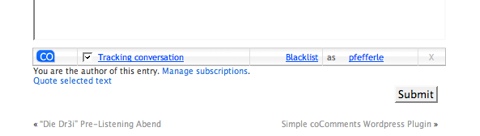
coComments Bar

Download

simple_coco.zip V0.1

Customize coComment using CSS

I found an article for customizing the coComment using CSS at Andrea Michelonis weblog and uploaded a CSS file with the complete structure of the HTML Code of the script.

Be sure to use !important in the CSS file to overwrite the original settings.
Sample: table#cocomment-minibar { font-size: 18pt !important; }

custom_coco.css

Right-click „save as“

21 Kommentare zu „Simple coComments“

  1. […] dazu auf der Simple coComments Seite… yigg itwong it bookmark […]

  2. Avatar von fmf

    You say no theme cutomization, but in my template the cocomment box isn’t aligned as i’d like.
    Can i change it with some css?

    Thanks.

  3. Avatar von Pfefferle

    [quote post=“347″]Can i change it with some css?[/quote]

    The problem is, that you can’t style a <script> tag with CSS. I tried to surround the tag with <div> and <span>, but it doesn’t work either. I think the problem is, that the JavaScript apends to the textbox so your only possibility is, to style the textarea.

    If someone has a better idea, please post it, so I can change the plugin.

  4. Avatar von Pfefferle

    I have an idea 🙂 after surfing through the net, I found a tutorial and uploaded a file with the complete HTML structure of the Script. Please look in the article above under „Customize coComment using CSS“.

  5. Avatar von Eric N.
    Eric N.

    If you use firebug, you can see what elements are created dynamically, and then modify your css to specifically target said elemtn… div.blah item item item { css };

  6. Avatar von Absinthyium
    Absinthyium

    Hi there, I have a CoComment account so I can see a bar like what’s in your screenshot right now as I type this comment, but it just doesn’t show on my blog. I already tried dropping the unzipped folder as is into my Plugins folder and I activated it, but I didn’t see anything on the blog. Right now, I have just the .php uploaded to the Plugins folder, it’s activated, but still not showing? Am I missing something? Please help, I really like this plugin and would love to implement it on my blog, Thanks!

  7. Avatar von Pfefferle

    @Absinthyium: I’ve checked your website and everything works fine with simple-cocomments… you only changed the design…

  8. Avatar von Absinthyium
    Absinthyium

    Oh, you can see it now because it is not Simple coComments… it’s the code for WP provided directly from the coComments website and hard-coded into the template. Plugin won’t work still, sorry.

  9. Avatar von sure
    sure

    [quote comment=“980″]@Absinthyium: I’ve checked your website and everything works fine with simple-cocomments… you only changed the design…[/quote]

    ok….

  10. Avatar von Christopher A. Wheeler

    This plugin, when activated, interferes with the Picasa Lightbox plugin. Do you know anything about that?

  11. […] Simple CoComments – Tracks the conversation across blogs. […]

  12. […] Simple CoComments – Tracks the conversation across blogs. […]

  13. […] Simple CoComments – add coComments support to your wordpress […]

  14. […] Simple CoComments Verbindet die Kommenater über mehrere Blogs. […]

  15. […] Simple CoComments – Tracks the conversation across blogs. […]

  16. […] Simple CoComments – Seguir las conversaciones a través del blog. […]

  17. […] conversations, but this is rapidly changing with the introduction of plugins such as phreadz, cocomments, or new kid on the block comment reply via email, which are turning blogs into interactive […]

  18. […] Simple coComments – 为你的Wordpress博客添加coComments支持. […]

  19. […] Simple coComments – 为你的Wordpress博客添加coComments支持. […]

  20. […] Simple CoComments – 在多个博客跟踪评论。 […]

  21. […] Simple CoComments – Tracks the conversation across blogs. […]

Schreibe einen Kommentar

Deine E-Mail-Adresse wird nicht veröffentlicht. Erforderliche Felder sind mit * markiert

To respond on your own website, enter the URL of your response which should contain a link to this post’s permalink URL. Your response will then appear (possibly after moderation) on this page. Want to update or remove your response? Update or delete your post and re-enter your post’s URL again. (Find out more about Webmentions.)